How it works
Three steps, all year.
A child makes something. You see it. It joins their jar, dated and tagged.
A photo, a drawing, a voice note, their own words
Four icons, one tap each. A three-year-old gets there on their own.
You see every moment first
Approve it, tag a skill, or send it back with a kind note. Nothing is kept until you have seen it.
A year of evidence, child by child
Dated, skill-tagged, ready for leadership, moderation or a proud family.
The drawing canvas
A pot of felt-tips, on a screen.
Full-screen and child-led. Pencils, pens and markers rise from the bottom edge, the chosen one lifted. A rainbow colour slider, shapes, text boxes, pages, undo. Four-year-olds find their way with the icons alone.
Works with a finger, a stylus or a mouse
Photos and voice
Point, snap, popped in.
The junk model, the tricky maths on a whiteboard, the tower that took all of golden time. Captured on the classroom iPad in seconds, with a caption in the child's own words, typed or spoken.
🔊 A voice note works before reading does
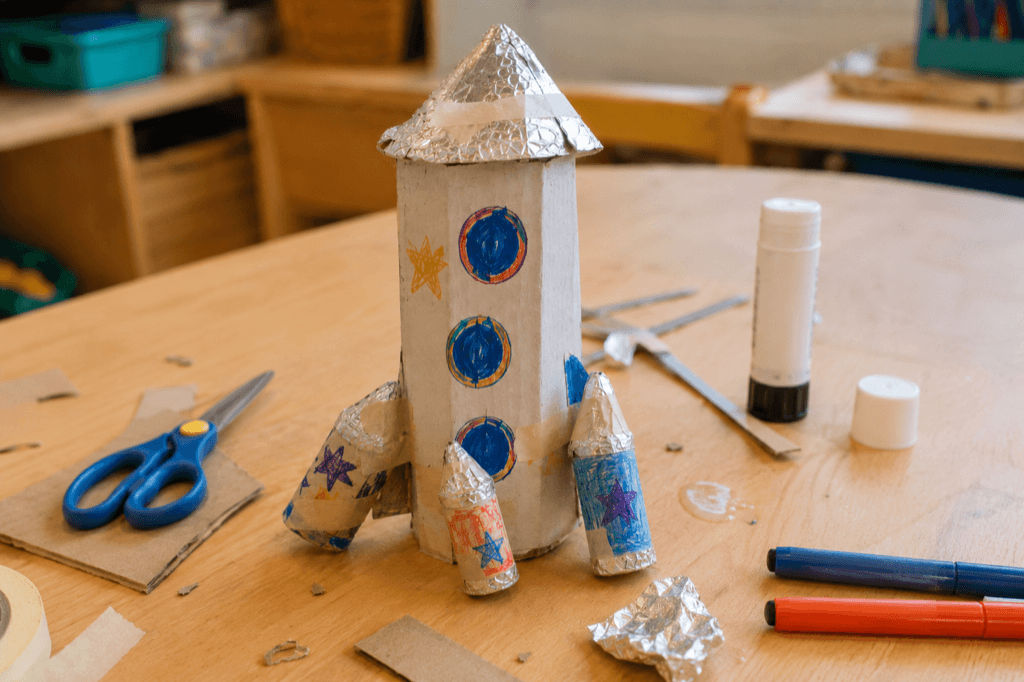
“my rocket has 3 boosters because i want it to fly into space fast”
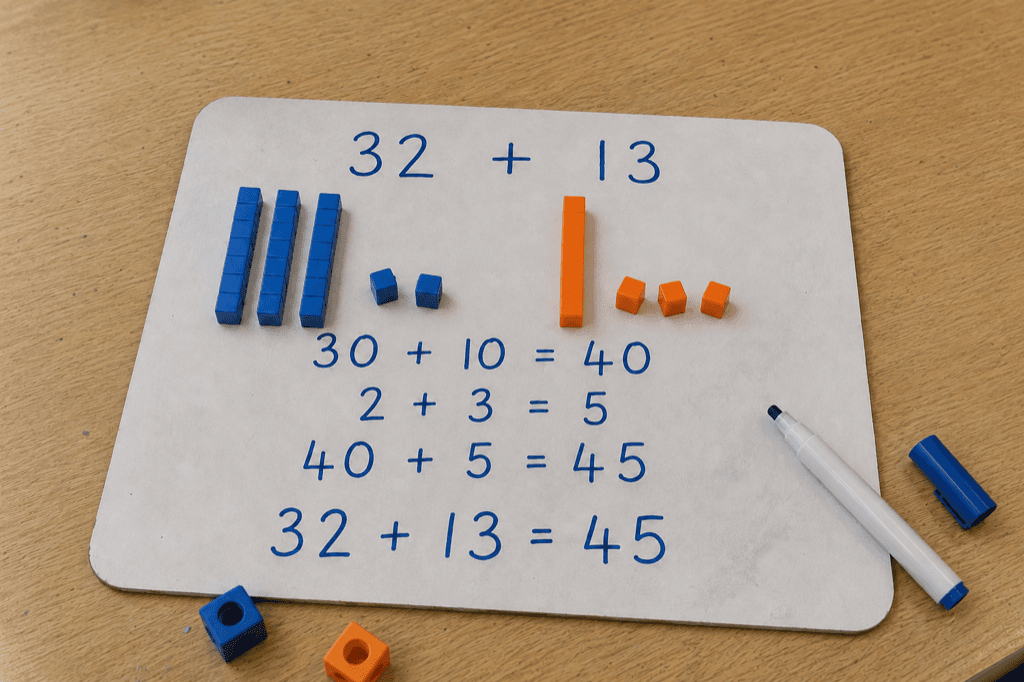
🔊 Voice“I did thirty and ten is forty, then two and three is five, so it's forty-five”
Activities
Build it once, teach it every year.
A library of reusable activities: instructions, tags, and a worksheet or drawn template children work directly on top of. Assign to a whole class or a few children, then reassign next September in one tap. Teach more than one class and they all live under one roof.
Label the parts of a plant
Science · worksheet template
Show me your best pattern
Maths · photo response
Read your sentence out loud
Phonics · voice response
News from my weekend
Writing · reused from last year
The approval queue
Marking, minus the pile.
Every submission waits in one queue, built to be cleared. Approve in two taps, tag skills as you go, send one back with a kind note, or clear the lot at 8pm with a cup of tea.
Poppy · drawing
Label the parts of a plant
Jesse · photo
Show me your best pattern
Amara · her words
News from my weekend
Safeguarding
Our promises to your school.
Not small print. The whole point.Children sign in with a code and their own name
A short class code, then they tap their name. First names only, so there is nothing to forget and nothing to leak.
Nothing exists until you approve it
Every moment passes through your queue before it joins a child's jar. You are the gatekeeper, by design, always.
UK GDPR, and your data stays in Europe
Built for UK schools' obligations from day one, with a data agreement ready for your office and export or deletion on request.
Built by a serving UK primary teacher
Made by someone who does the school run, the marking and the moderation meetings. It exists because the classroom needed it.
Families watch the jar fill up from home
A quiet, read-only view for parents and carers: only what you have approved, only their own child, and a heart is the whole channel back. On the roadmap alongside video, groups and scheduled activities.
I teach in a primary school in the North East, and I built StoryJar in my own time, in the evenings and the holidays. The tools we were handed made evidence-gathering feel like admin, and the children's work deserved better than a folder on a shelf. Every decision in it comes from what a teacher actually needs at four o'clock on a Thursday, with thirty book bags still to pack.
Mark Pearson Creator of StoryJar
Free for you. £199 to £649 for your school.
Every feature is in every band. Your band is set when you join and fixed for the year.
Teacher
Free
permanently · card-free, clock-free
- ✓ Every class you teach
- ✓ Unlimited moments and approvals
- ✓ Canvas, photos, voice and words
- ✓ Families see approved work
- ✓ Export your data whenever you like
School plan
from £199 a year
banded by pupils on roll · prices are the price
- Up to 105 pupils£199
- Up to 210 pupils£299
- Up to 420 pupils£449
- Over 420 pupils£649
- ✓ Everything in the teacher plan, for all your staff
- ✓ Oversight for leadership across the school
- ✓ Staff, classes and an audit log in one admin console
- ✓ Work stays with the school when staff move on
- ✓ A data agreement naming the school as controller
- ✓ Pay by card or invoice and PO
Pay by card or purchase order. Full refund within 42 days if it isn’t right for your school.
Questions teachers ask.
Do children need email addresses or passwords?+
No, never. Children sign in with your class code and by tapping their own name. We store first names only: no surnames, no emails, no dates of birth.
Can anything reach a child's jar before I see it?+
No. Every moment a child makes waits in your approval queue. You approve it, tag it, or send it back with a note, and it is kept once you say so.
Does it count as assessment evidence?+
That is the point of it. Every approved moment is dated and can be tagged against skills, building a per-child evidence base across the year for leadership, moderators or Ofsted.
What devices does it work on?+
Anything with a browser. Child screens are designed for classroom iPads in landscape first, and the teacher side works beautifully on a laptop, including at 8pm on the sofa.
Where is the data stored?+
In Europe, in Amsterdam, under UK GDPR. A data processing agreement and a full sub-processor list are available for your school office, and you can export or delete your class's data at any time.
When can parents see the jar?+
A read-only family view is on the roadmap. Parents see their own child's approved moments only, and you switch it on when you are ready.
Start your class jar today.
Free for one teacher and every class they teach. Your children can pop their first moment in before home time.
Start your class jarStoryJar is a data processor for schools · Data kept in Europe · © 2026 StoryJar · storyjar.co.uk